
Reduce a PDF below 2 MB, 1 MB or 500 KB
Published · Updated 3 min read
An administrative portal or a job application form imposes a weight limit, 2 MB, 1 MB or 500 KB, rarely a quality. The best compression level is the highest one that gets under the limit, and the weights below let you choose it without guessing.
Two types of documents
A 10-page report with text, charts and photos weighs 7.9 MB. A 3-page grayscale scan weighs 3.7 MB. The weights depend on the content: a busier scan will give higher figures, but the progression from one level to the next stays the same.
The weight by level
Compress PDF offers three levels.
| Level | 10-page report | 3-page scan |
|---|---|---|
| Original document | 7,9 MB | 3,7 MB |
| Low (min size) | 306 KB | 140 KB |
| Medium (balanced) | 742 KB | 329 KB |
| High (max quality) | 3,8 MB | 1,2 MB |
The High level keeps the images at 150 dots per inch, which leaves almost nothing to gain on an illustrated report: 3.8 MB does not get under 2 MB.
What you see at each level
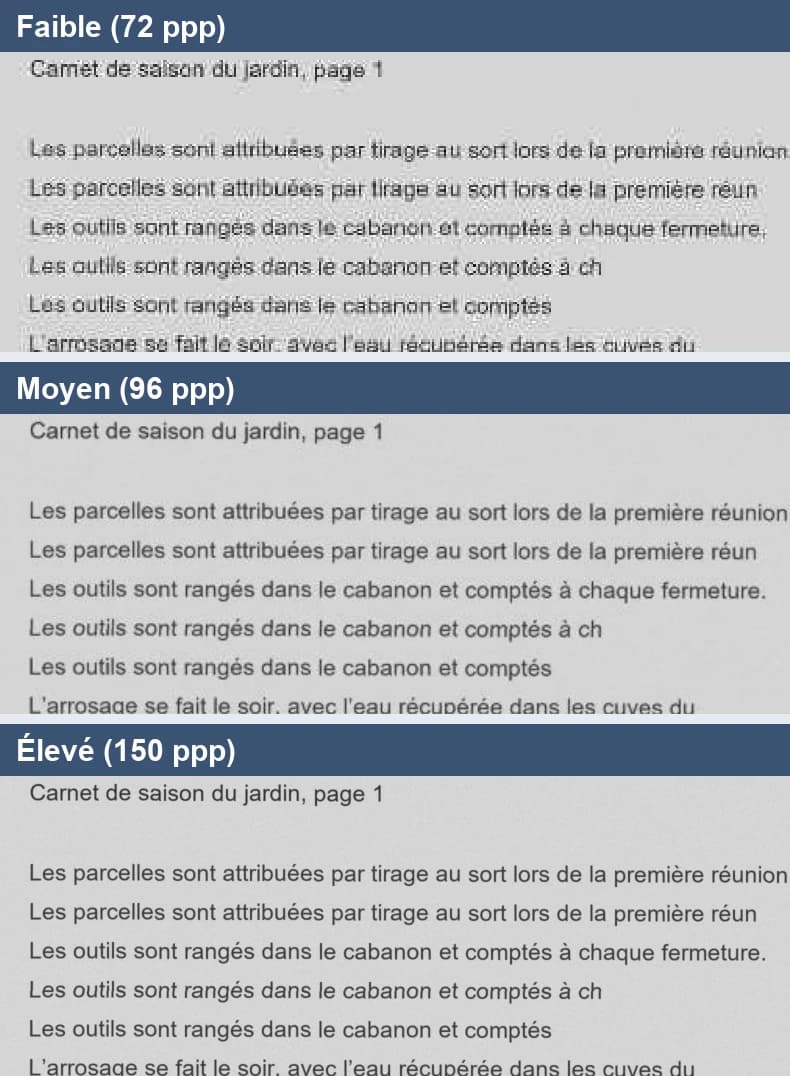
At the Low level, the text stays legible but the edges soften. The Medium level gives sharp text at the size of a page. The High level is the most faithful.
Choosing by the limit
| Portal limit | 10-page report | 3-page scan |
|---|---|---|
| 2 MB | Medium (742 KB) | High (1.2 MB) |
| 1 MB | Medium (742 KB) | Medium (329 KB) |
| 500 KB | Low (306 KB) | Medium (329 KB) |
In each cell, the level shown is the highest one that gets under the limit. Keep a small margin, explained below.
When the level is not enough
- Remove the useless pages with Delete or extract pages from a PDF: each page removed lightens the file.
- If the portal accepts several pieces, split the document into several files, each under the limit.
- Take the photos of the document back at the source with Reduce a photo below 200 KB, 500 KB or 1 MB before redoing the PDF.
The neighboring action, lightening a PDF before sending it by message, is detailed in Send a PDF that is too heavy by email.
A margin for the unit
The tool counts MB at 1,048,576 bytes each. A portal that counts in millions of bytes shows a slightly larger number for the same file: a PDF of 1.95 MB according to the tool goes over 2,000,000 bytes. Aim for about 10% under the limit.
For which portals
An application file, an administrative procedure or an insurance form often impose 2 MB, 1 MB or 500 KB: choosing the right level avoids several attempts.
Check before sending
- Open the resulting PDF and read the densest page, the figures and the signatures in particular.
- Count the pages.
- Look at the weight in the file explorer, not only in the tool.
Frequently asked questions
- How do you reduce a PDF below 1 MB?
- Compress at the Medium level, then check the weight. In the example, a 10-page report gets under 1 MB, and so does a 3-page scan.
- What if the Low level is not enough?
- Remove the useless pages, split the document into several files or take the photographs back at the source.
- Why does my file go over the limit when the tool shows it below?
- The tool counts 1,048,576 bytes per MB, the portal may count one million. Aim for about 10% under the limit.
- Does the text become blurry?
- At the Low level, the edges soften. The Medium level gives sharp text at the size of a page.