
Turn a video into a GIF without making it huge
Published · Updated 3 min read
A GIF is a short animated image that loops, very handy for illustrating a gesture or a reaction. Yet it quickly weighs several megabytes. Three settings decide its weight: the width, the number of frames per second and the length. The width is the one that weighs the most.
The four settings
Create a GIF from a video offers four settings.
| Setting | Range offered | Default value |
|---|---|---|
| Start | Start time in the video | 00:00:00 |
| Length | In seconds | 3 |
| Frames per second | From 5 to 30 | 10 |
| Width | From 240 to 960 pixels | 480 |
The width
For a length of 3 seconds and 10 frames per second, the weight is multiplied by more than nine between the smallest and the largest width.
| Width | Dimensions | Resulting weight |
|---|---|---|
| 240 px | 240 × 135 | 145 KB |
| 480 px | 480 × 270 | 407 KB |
| 720 px | 720 × 405 | 846 KB |
| 960 px | 960 × 540 | 1,3 MB |
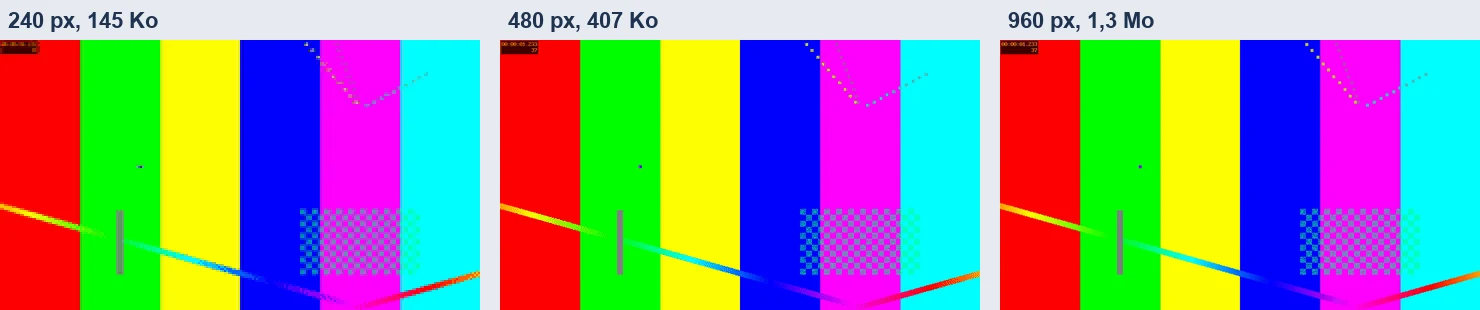
At equal display size, the difference shows mostly on fine details, such as small text, legible from 480 pixels.
Frames per second
A GIF is a series of still frames. The more there are per second, the smoother the movement, and the heavier the file. With 3 seconds and 480 pixels wide, each step of 5 frames per second adds about 200 KB.
| Frames per second | Frames in the GIF | Resulting weight |
|---|---|---|
| 10 | 30 | 407 KB |
| 15 | 45 | 600 KB |
| 20 | 60 | 805 KB |
The length
With 480 pixels and 10 frames per second, the weight follows the length.
| Length | Resulting weight |
|---|---|
| 3 seconds | 407 KB |
| 5 seconds | 695 KB |
| Whole video, 20 seconds | 2,8 MB |
When the requested length goes past the video, the GIF stops at the end of the video: with 30 seconds requested on a 20-second video, you get 20 seconds of animation.
A heavy setting
With 10 seconds, 15 frames per second and 960 pixels wide, the GIF weighs about 6.6 MB. The processing takes a few seconds, from 3 to 9 depending on the settings.
What all GIFs have in common
The GIFs obtained loop endlessly. The format is limited to 256 colors per image, which makes it less sharp than a video: for a long or detailed sequence, a video is lighter.
Aiming for a light GIF
- Cut the sequence as short as possible: Cut a video before sharing it details the action.
- Keep 10 frames per second and 480 pixels wide, about 400 KB for 3 seconds.
- Increase the width only if a fine detail must stay legible.
- To keep the whole sequence, lighten the video with Lighten a video before sending it rather than converting it to a GIF.
For which uses
A reaction for a conversation, a demonstration of a few seconds in an article, a short animation for a site: the GIF loops without sound, but quickly gets heavy.
Check the GIF
- Open the GIF and watch it until the end of the loop.
- Check the legibility of the smallest text.
- Look at the weight in the file explorer.
Frequently asked questions
- How do you make a light GIF?
- Keep the sequence short, 10 frames per second and 480 pixels wide: about 400 KB for 3 seconds.
- Which setting weighs the most?
- The width: the weight is multiplied by more than nine between 240 and 960 pixels.
- Why is my GIF less sharp than a video?
- The format is limited to 256 colors per image. For a long or detailed sequence, a video is lighter.
- Can you make a GIF of the whole video?
- Yes, by asking for the whole length: about 2.8 MB for 20 seconds at 480 pixels and 10 frames per second.